
AI Workflow Automation for Businesses: What Should You Automate First?
The right first automation isn't the flashiest one. It is a repetitive, measurable workflow with clear rules, trustworthy data, and a safe route back to a person when something doesn't fit.

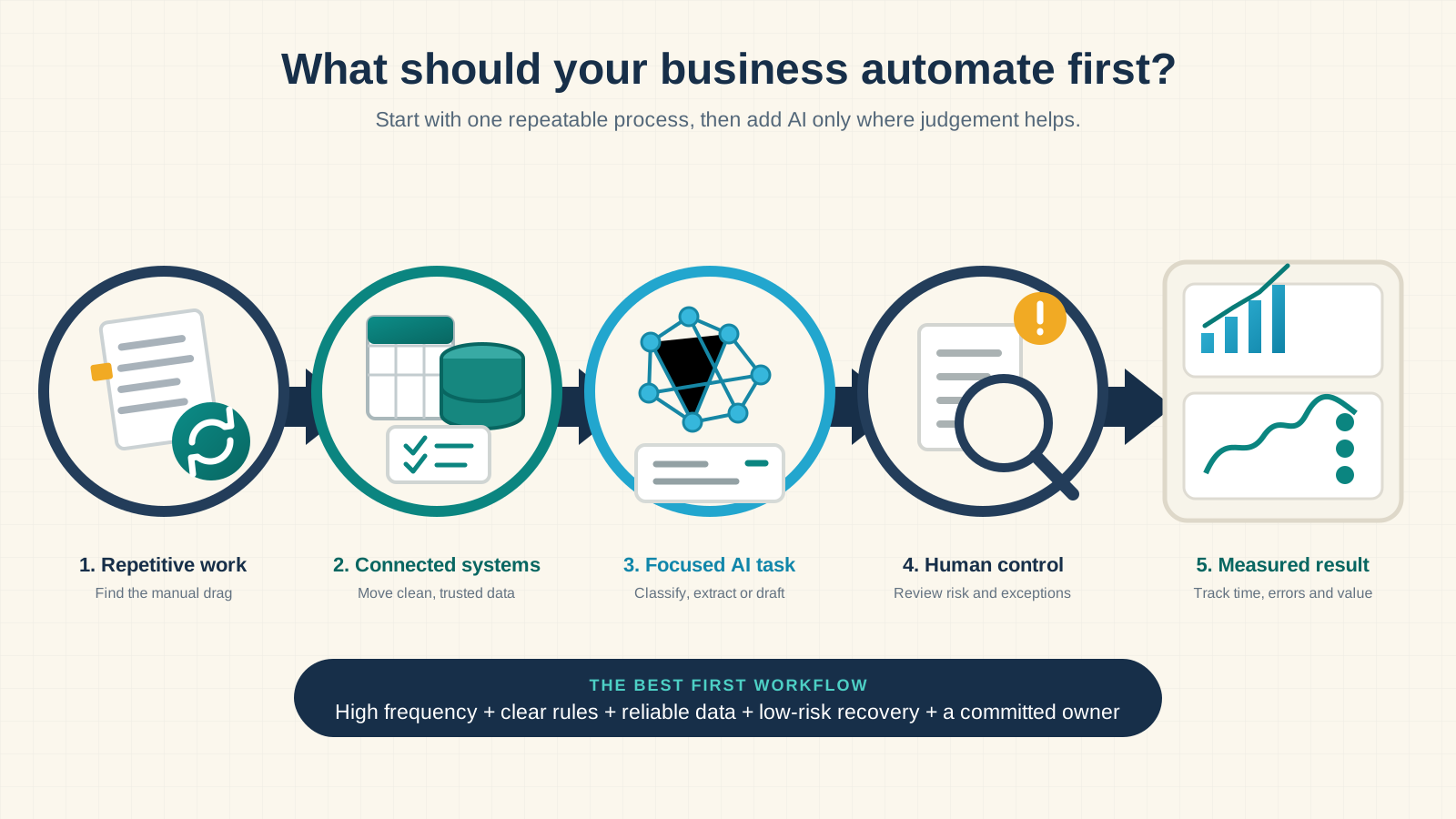
Short answer: what should you automate first?
Start with one frequent, rules-based workflow that causes a visible delay or cost. It should use reliable data, have a clear owner, and be easy to pause or review when something unusual happens. For many businesses, that means lead follow-up, inbox triage, client onboarding, CRM updates, or a recurring report, not a fully autonomous AI agent.
I usually hear about automation when a team is already tired of the work. Leads sit in an inbox until someone notices them. A new client sends the same information twice. Friday's report begins with three spreadsheets and ends with somebody checking totals late in the day.
Those frustrations are useful clues, but annoyance alone isn't a business case. The best first workflow sits where repetition, measurable value, stable rules, and manageable risk overlap. This guide shows you how to find that workflow and decide whether it needs a normal integration, a small AI step, or custom software.
What is AI workflow automation?
AI workflow automation connects the tools your business already uses and moves work through a repeatable sequence. An event starts the process, the workflow collects and validates information, rules decide what is allowed, and AI can help with one narrow judgement task. The system then updates a record, prepares an action, or asks a person to review it.
Imagine a potential customer submits a website form. A controlled workflow could check the contact details, identify the requested service, add the lead to your CRM, draft a relevant reply, assign an owner, schedule a follow-up, and record each step. A person still handles unusual, sensitive, or high-value enquiries.
The AI isn't the whole workflow. Authentication, APIs, permissions, duplicate protection, logs, retries, and human decisions are what make it dependable.
Automation, AI workflows, and AI agents are different
| Approach | How it works | Best use |
|---|---|---|
| Rule-based automation | Follows fixed if-this-then-that instructions | Reminders, data transfer, calculations, known-field routing |
| AI-assisted workflow | Uses AI for one controlled step inside fixed boundaries | Classification, extraction, summarization, or drafting |
| AI agent | Chooses tools and decides which action to take next | Variable work where a fixed route is genuinely insufficient |
Most businesses should begin in the middle column. You gain flexibility where language is messy, but rules still control permissions and business actions. If the workflow later reveals decisions that truly can't be expressed as rules, you can add carefully bounded agent behaviour. My AI agents vs traditional automation guide covers that decision in more detail.
Seven workflows worth evaluating first
There is no universal winner, but these processes repeatedly create avoidable friction in service businesses and growing teams.
1. Lead capture and follow-up
This is often the strongest first project because delay has a visible commercial cost. A workflow can collect enquiries from forms, chat, ads, email, or spreadsheets; validate the details; update the CRM; assign an owner; and prepare the next response. AI is useful when it needs to pull budget, urgency, location, or intent from free-form text.
Prioritize it when leads arrive through several channels, staff copy details manually, response quality is inconsistent, or nobody can see which enquiries still need attention.
2. Customer enquiry triage
A shared inbox becomes expensive when every message must be read, labelled, and forwarded by hand. AI can identify the customer, classify the topic, summarize the request, and route it to the right queue. Begin with suggested categories and draft replies. Let people approve customer-facing answers until real results show where automation is trustworthy.
3. Client onboarding
Signed agreements often trigger the same chain: send an intake form, request files, create folders, add a project, schedule a kickoff, and notify delivery. Automating the handoffs makes the experience consistent without taking away the human welcome. Missing information should create a reminder or review task, not a silent failure.
4. Scheduling and no-response follow-up
Booking software handles calendar selection, but confirmations, preparation notes, rescheduling, missed appointments, and post-meeting tasks still spill across tools. Keep dates and availability deterministic. Use AI only if an unstructured reply needs to be understood.
5. CRM updates and repetitive data entry
When customer details live in forms, email, spreadsheets, and a CRM, staff spend time copying information and fixing duplicates. Decide which system is authoritative, validate approved fields, and flag conflicts. Cleaner data improves sales, support, reporting, and every later AI project.
6. Proposals, invoices, and payment reminders
Use your existing software's native features first. Build a custom workflow when information must cross several systems or the next step depends on project status. Amounts, recipients, payment state, and escalation rules should be checked by code. AI may draft a contextual note, but it shouldn't decide what somebody owes.
7. Recurring operational reports
A workflow can gather approved metrics, detect missing data, calculate totals, and prepare a narrative for review. Keep source figures separate from generated commentary. Let AI explain a trend, never invent or recalculate the underlying number.
How to choose the first workflow to automate
Make a shortlist from real work, not a software demo. Watch the process, talk to the people doing it, and inspect examples of both normal and difficult cases. Then score each candidate from one to five.
| Factor | Question to ask | A high score means |
|---|---|---|
| Frequency | How often does this process run? | It happens often enough for small savings to compound |
| Manual effort | How much time goes into checking, copying, correcting, and chasing? | The complete process consumes meaningful team time |
| Delay or error cost | What happens when it's late or wrong? | Improvement protects revenue, delivery, or experience |
| Process clarity | Can the team explain the normal steps and decision rules? | The route and expected result are consistent |
| Data readiness | Are inputs reliable and integrations available? | Systems expose usable APIs, webhooks, or events |
| Recoverability | Can a mistake be reviewed, reversed, or contained? | Failures don't create irreversible harm |
| Ownership | Who approves rules and handles exceptions? | A named business owner cares about the outcome |
Subtract points for high exception rates, sensitive data, irreversible actions, unclear ownership, and changing policies. The best first project is rarely the task with the highest raw time cost. It is the one that combines value with a realistic chance of working well.
A quick example
Automating a monthly three-hour report saves 36 hours a year. Automating a six-minute lead task that happens 25 times each workday affects roughly 650 hours of annual activity. Volume changes the calculation, but risk and maintenance still matter.
Estimate value without inventing an ROI promise
Start with a baseline your team can defend:
Monthly manual cost = runs per month × minutes per run × loaded hourly cost ÷ 60
Add the cost of delays, preventable errors, rework, and missed follow-up only when you can estimate them honestly. Then compare that baseline with implementation, software, model usage, monitoring, maintenance, and the human review that will remain.
Do not assume the system removes every minute. A good first version usually handles the routine path and makes exceptions easier to resolve. Measure cycle time, manual touches, error rate, response time, exception rate, approval time, and cost per completed run before and after launch.
What a reliable AI workflow includes
A production workflow isn't just a row of connected boxes. It needs clear boundaries and a way to explain what happened.
- Trigger: define the exact event that starts the workflow and give it a unique identifier.
- Validation: check required fields, formats, permissions, duplicate events, and stale records.
- Rules: keep calculations, allowed actions, routing policy, and access decisions outside the AI prompt.
- Focused AI step: ask for one narrow task and require structured output that can be validated.
- Human fallback: send low-confidence, unusual, sensitive, or failed cases to a visible queue.
- Safe action: protect against duplicate writes and confirm state before sending, publishing, or updating.
- Logs and monitoring: record what ran, which version was used, what it attempted, and why it stopped.
Give every integration the minimum access it needs. Keep development and production credentials separate. Do not pass a complete customer record to a model when two fields are enough. If you use n8n, review its current privacy and security guidance; if you use OpenAI, confirm the current settings in the official API data controls documentation.
What shouldn't be automated first?
- A process that nobody performs or explains consistently.
- Rare work with little cost, delay, or learning value.
- Legal, financial, hiring, safety, or other high-impact decisions without accountable review.
- Unrestricted payments, destructive actions, publishing, or permission changes.
- A workflow built on incomplete, duplicated, or disputed source data.
- Customer communication that hasn't been tested against real examples.
- A giant project described as “automate the whole business.”
“Not ready yet” is a useful result. Fixing ownership, data, or process clarity can create more value than forcing AI into unstable work.
A practical path from idea to production
1. Observe and baseline
Document the trigger, inputs, decisions, systems, outputs, exceptions, current time, and current failure rate. Include the workarounds people use but never wrote down.
2. Define the smallest useful version
Choose one trigger, one normal path, one measurable outcome, and explicit exclusions. Resist adding departments or edge cases before the core path works.
3. Prototype with restricted access
Use synthetic or approved test data. Build validation, duplicate protection, failure routes, and a kill switch before connecting consequential actions.
4. Run in shadow mode
Let the workflow record what it would classify, draft, or update without performing the action. Compare it with human decisions using real examples, including missing fields, duplicates, ambiguous requests, timeouts, and permission failures.
5. Move to approval mode
Allow the workflow to prepare the work while a named person approves, edits, or rejects it. Record the reasons for overrides; they show whether the model, rules, data, or business policy needs attention.
6. Automate only the proven path
Enable low-risk cases supported by evidence. Keep exceptions and sensitive actions behind review. Assign business and technical owners, monitor failures, and retest whenever integrations, policies, prompts, or models change.
What happens in an AI workflow discovery call?
A useful discovery call isn't a pitch to add AI everywhere. We take one repetitive process and work through its volume, delays, systems, data, decision rules, exceptions, permissions, and owner. Then we decide whether existing software, a normal integration, an AI-assisted workflow, or custom development is the sensible next step.
Bring a rough monthly volume, the tools involved, and a few examples of both normal and unusual cases. You don't need a technical specification. If the process isn't ready to automate, I'll say so.
Start with one measurable workflow
AI workflow automation creates value when it's attached to a real operational problem. Choose a repetitive process, define its trigger and outcome, keep rules deterministic, use AI only where language judgement helps, and make exceptions visible to a person.
The first win should teach your team how automation behaves in the real business. Once the process is stable and measurable, you can expand with evidence instead of optimism.
Key takeaways
- Start with frequency, clarity, data quality, recoverability, and ownership.
- Use rules for predictable work and AI for narrow language tasks.
- Compare total operating cost with measured time, errors, and delays.
- Test in shadow and approval modes before allowing business actions.
- Keep a person responsible for exceptions and sensitive decisions.
Frequently asked questions
Straight answers to the questions business owners ask before automating a workflow.
What is AI workflow automation?
AI workflow automation connects business tools and moves work through a repeatable process. Rules handle predictable steps, while AI can perform a narrow task such as classifying a message, extracting document data, summarizing a call, or drafting a response.
What business process should I automate first?
Start with a frequent, rules-based process that uses reliable data, creates a measurable delay or cost, and can recover safely from errors. Lead routing, inbox triage, client onboarding, CRM updates, document intake, and recurring reporting are common first candidates.
Does every automated workflow need AI?
No. Fixed rules are better for calculations, known-field routing, validation, reminders, and data transfer. Add AI only when a step benefits from interpreting unstructured language, extracting meaning, summarizing information, or preparing a draft.
How much does AI workflow automation cost?
Cost depends on process complexity, integrations, exception paths, security, software subscriptions, model usage, testing, monitoring, and maintenance. Compare total operating cost with time saved, errors reduced, faster response, and recovered opportunities.
Can AI automation work with our existing software?
Often, yes. Existing CRM, email, calendar, accounting, forms, help desk, spreadsheets, and project tools can usually connect through APIs, webhooks, native integrations, exports, or controlled email events. Confirm access before promising an implementation.
How long does an AI automation project take?
A narrow workflow can be evaluated and piloted much faster than a multi-team system. Timing depends on process clarity, integration access, data quality, exceptions, testing, and approvals. Scope the first measurable outcome before estimating delivery.
Does my business need an AI agent?
Probably not at first. Most businesses get more value from fixed rules with one or two focused AI tasks. Consider an agent only when the route genuinely changes from case to case.
Is business data safe in an AI workflow?
It can be, but safety depends on the design. Limit permissions, send only necessary data, validate outputs, protect credentials, keep useful logs, and require human approval for sensitive actions.
Which tools are used for AI workflow automation?
The stack may include native app features, Zapier, Make, n8n, APIs, an AI model, and custom code. I choose tools after defining the process, data, risk, and maintenance needs.
Is AI workflow automation useful for a small business?
Yes, when a small team repeats the same process often enough. One focused workflow can improve response time and consistency without becoming an expensive company-wide project.
How do I measure whether an automation is working?
Record a baseline first. Compare cycle time, manual touches, errors, response time, exception rate, review time, and cost per completed run. Measure the business outcome, not just workflow runs.
Does an AI workflow need ongoing maintenance?
Yes. Credentials expire, APIs change, business rules evolve, and unusual cases appear. Give it an owner, monitor failures, and retest after important tool, model, or policy changes.
What should I prepare before an automation discovery call?
Bring one repetitive process, its rough monthly volume, the tools involved, and a few normal and unusual examples. Identify who owns the result. You don't need a technical specification.
Which workflow should you automate first?
Book a free 20-minute discovery call. We will map one repetitive process and decide whether rules, integrations, AI, or custom software are the right fit.